Douyin to MP3 Converter
Want to save the audio from a Douyin video? Simply paste the video link below and convert it to MP3 for free.
How to Use the Douyin to MP3 Converter
You can save the audio in a few clicks. Here’s how:
- 01
Copy the Video Link
First, open the Douyin video you want to download. Tap Share and copy its link.
- 02
Paste the Link
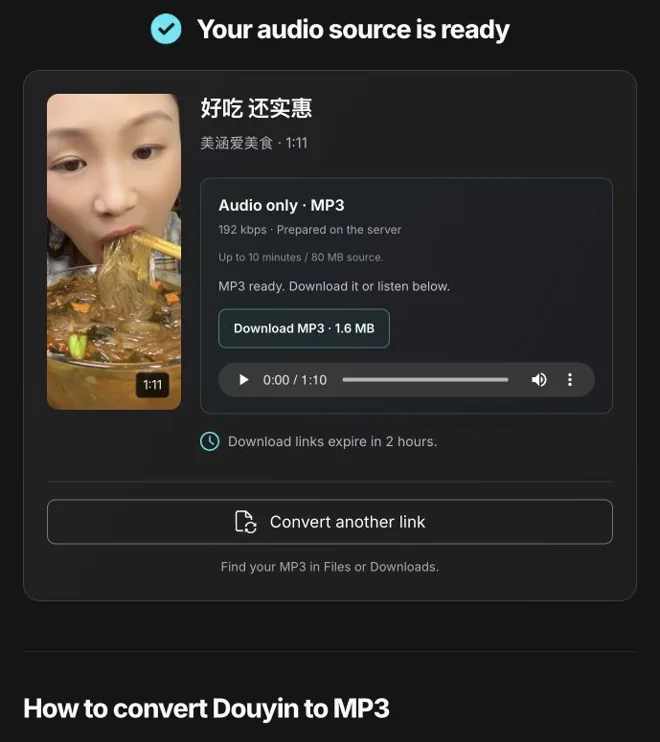
Now paste the link into the tool and click Convert to MP3. You’ll see the video’s title and thumbnail. Check that it’s the right video, then click Prepare MP3.
- 03
Download the MP3
Once the MP3 is ready, you can play it to check the audio. Click Download MP3 to save it on your device.
Download Douyin Audio as MP3
Sometimes you only want the audio from a video. With the Douyin to MP3 converter, you can save it as an MP3 and listen to it later without opening Douyin each time.
You don’t need to download the video first or install a separate app. Just paste the link and let the tool prepare the audio. You can then listen to the preview and download the MP3.
Need the video too? Use the Douyin video downloader →
MP3
192 kbps output
Up to 10 minutes
Up to 80 MB source
No signup or installation
Paste Your Douyin Video Link
You can use a short share link like https://v.douyin.com/…/, a full https://www.douyin.com/video/… link, or the full share message copied from the app. Just make sure it links to a public video.
The downloaded MP3 contains the same audio you hear in the video. If there’s music and someone speaking, both will be included. Only download audio you own or have permission to save.
FAQs
Is this Douyin to MP3 converter free?
Yes. You can download audio from supported public Douyin videos without paying or creating an account. You don’t need to install an app either.
How do I download a Douyin video as MP3?
Simply copy the video link and paste it into the tool above. Click Convert to MP3, then Prepare MP3. Once it’s ready, click Download MP3 to save the audio.
What quality is the MP3?
The tool saves audio at 192 kbps. How it sounds still depends on the original video. If the recording is unclear, converting it to MP3 won’t make it clearer.
Can I convert any Douyin video?
The video needs to be public, no longer than 10 minutes, and within the 80 MB source limit. Private videos, deleted posts, live streams and photo posts won’t work. Some public videos may also be unavailable.
Can I download the music without the voices?
The MP3 includes everything you hear in the video, including music, voices and background sounds. There isn’t an option to remove voices or save only the music.
Does it work on my phone?
Yes. You can use it in your browser on iPhone, Android, Windows or Mac. After downloading, check your browser’s Downloads list. On an iPhone, you can also look in Files → Downloads.
Why is my MP3 not downloading?
First, check that the link opens a public Douyin video. Make sure it’s within the 10-minute and 80 MB limits too. If you see a busy or request-limit message, wait a little and try again. Some videos may have audio the tool can’t convert.
What if my download link expires?
Download links expire after 2 hours. Simply paste the original Douyin link into the tool again to get a fresh one. Save your MP3 before closing the page, as the audio preview won’t stay there.